အခုရက်အတွင်း Social Media တွေပေါ်မှာ အရမ်းကို စိတ်ဝင်စားစရာကောင်းတဲ့ Nano Banana AI Trend ဆိုတဲ့ trending ထွက်ပေါ်လာပါတယ်။ လူတွေက ကိုယ့်ရဲ့ ပုံတွေ သို့မဟုတ် အနုပညာဇာတ်ကောင်တွေကို 1/7 scale Figurine အရုပ်ပုံလေး For example် ပြန်ဖန်တီးပြီး Computer Desk ပေါ်မှာ တင်ထားသလို ဖန်တီးနိုင်တာပါ။ ထိုပုံတွေမှာတော့ အရုပ်အတွက် transparent acrylic base, BANDAI-style packaging box နဲ့ Zbrush တို့ ပါဝင်သည့် စတိုင်နဲ့ ထုတ်လုပ်ထားသလို ဓာတ်ပုံတွေ ထွက်ပေါ်လာတာကြောင့် လူကြိုက်များလာတာပါ။
Nano Banana AI ကို ဘယ်လိုသုံးမလဲ?
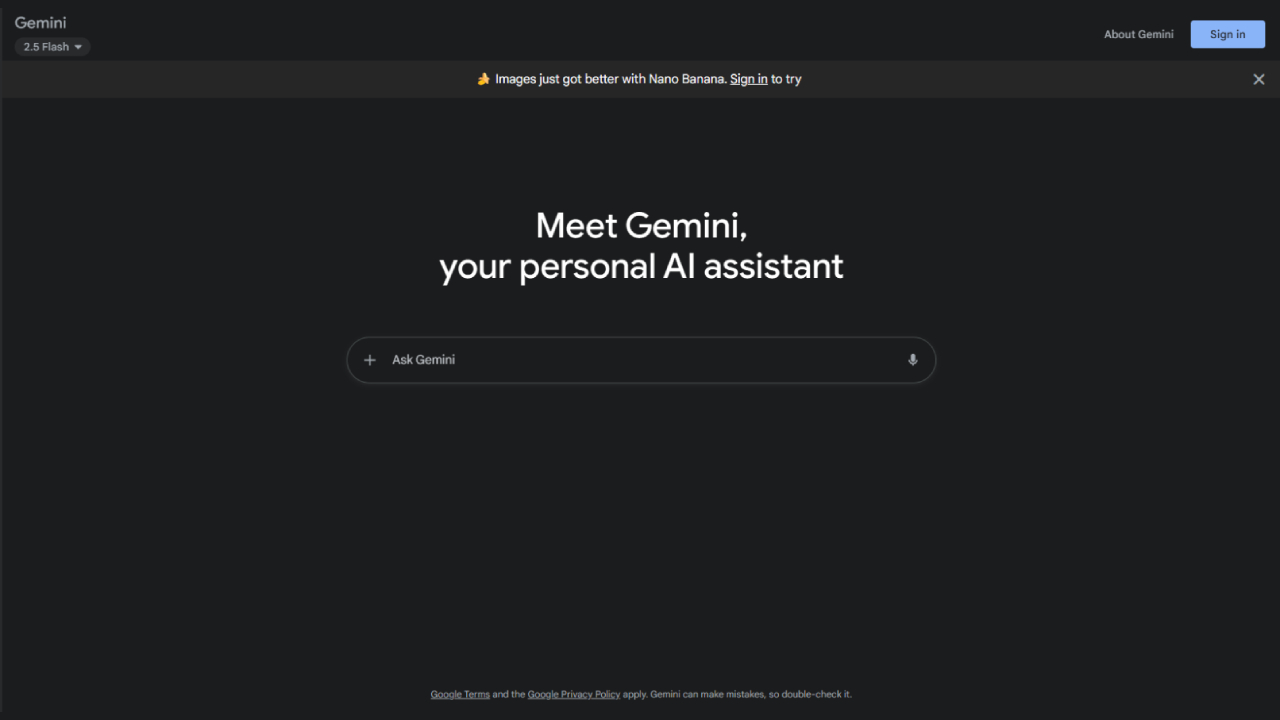
Step 1: Google Gemini (Web သို့မဟုတ် Mobile App) ကို ဖွင့်ပြီး Google Account နဲ့ Sign-in လုပ်ပါ
- မိမိဖုန်းမှာ Gemini App မရှိသေးရင် Store မှာ ဒေါင်းလုပ်လုပ်ပါ (Android/iOS).
- Web သုံးမယ်ဆိုရင် gemini.google.com ကို ဝင်ပြီး Login လုပ်ပါ။
Step 2: Tools မီနူးထဲက Create Image ကို ရွေးပါ
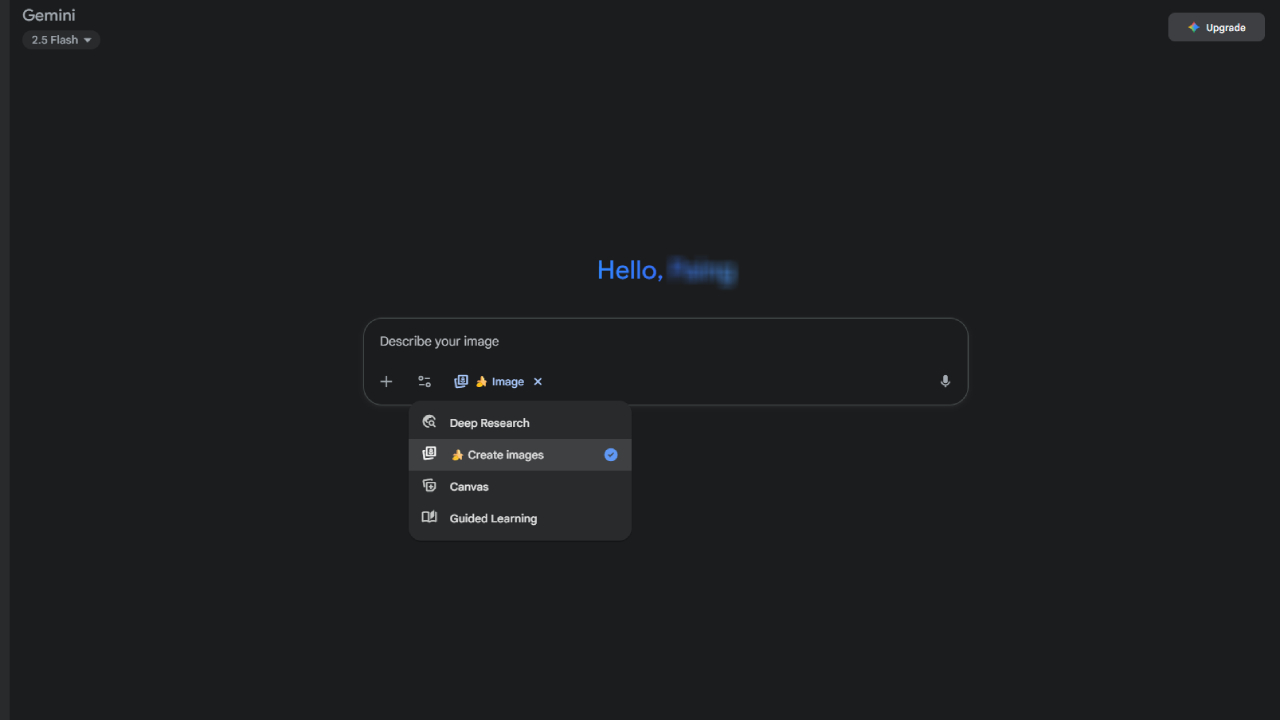
Step 3: (Figurine Trend အတွက် အကြံပြုချက်) မူရင်းပုံကို Upload/Attach လုပ်ပါ
- ပြတ်သားပြီး အလင်းအား ကောင်းကောင်းဖြစ်တဲ့ တစ်ကိုယ်လုံးပေါ်တဲ့ပုံကို ရွေးပါ (ကွက်လပ်နောက်ခံ/Background သန့် သဘောတရားက ပိုကောင်းတယ်)။
Step 4: Prompt ကို ရေးထည့်ပါ
အောက်က Figurine Prompt ကို တိုက်ရိုက်ထည့်သွင်းပါ (လိုချင်သလို prompt ကို ပြင်ဆင်နိုင်):
Create a 1/7 scale commercialized figurine of the characters in the picture, in a realistic style, in a real environment. The figurine is placed on a computer desk. The figurine has a round transparent acrylic base, with no text on the base. The content on the computer screen is the Zbrush modeling process of this figurine. Next to the computer screen is a BANDAI-style toy packaging box printed with the original artwork. The packaging features two-dimensional flat illustrations.
Step 5: Style & Details ကို ချိန်ညှိပါ
- Style presets (Realistic/Anime/Studio look)
- Texture (plastic sheen, painted finish), Lighting (soft light/spot/three-point)
- Aspect Ratio 1:1 ( Social platforms များအတွက် )၊ Resolution (HD/Standard)
Prompt ကို အပြင်အဆင်လေးတွေ ထပ်ညှိပါ
- "make the acrylic base thinner", "increase depth of field", "add subtle desk reflections", "use warmer lighting" စတာမျိုး။
လိုအပ်သည်များ ပြင်ဆင်ပြီးပါက generate ကို နှိပ်ပါ။ Generate ပုံရလာပါက download ကိုနိပ်ပြီး သိမ်းဆည်းနိုင်ပါတယ်။
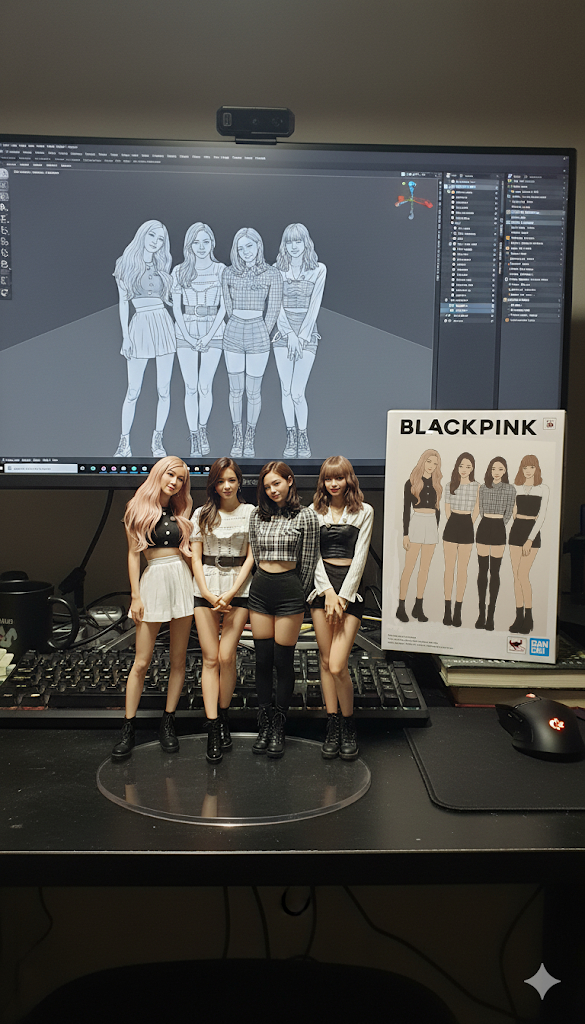
Prompt ထည့်တဲ့အခါ အကြံပြုချက်များ
- Subject စဉ်းစားချက်ကိုရှင်းရန်: character pose, camera angle (three-quarter view), lighting (soft studio), material (painted PVC/ABS) စသည့် စကားစုများ ထည့်ပါ။
- Product Look ကို သက်ရောက်ရန်: "BANDAI-style box", "transparent round acrylic base (no text)", "ZBrush modeling preview on monitor" စသည့် အပြင်အဆင် details များထည့်ပါ။
- အရောင်/ဘောင်: "neutral desk background, shallow depth of field, natural reflections".
အသုံးဝင်သော Check-list
- မူရင်းပုံ ထင်ရှား ပြတ်သားမှု (face/edge )
- Prompt ထဲမှာ scale, base, packaging, environment ကို တိတိကျကျ ရေးထားခြင်း
- Generate → Refine → Regenerate လုပ်ပီး အကောင်းဆုံးကို ရွေးခြင်း
Nano Banana AI Figurine Trend က ဘာလို့ လူကြိုက်များသလဲ?
- Creative Freedom – ကိုယ့်ဇာတ်ကောင်/ကိုယ်ပိုင်ပုံကို Figurine အဖြစ် ဖန်တီးနိုင်သည်။
- Product-like Realism – အမှန်တကယ် Toy Packaging နဲ့ Figurine အဖြစ်ပေါ်လာတဲ့အတွက် လူသုံးတွေရဲ့ စိတ်ဝင်စားမှုကိုဆွဲဆောင်တယ်။
- Fast & Easy – Prompt တစ်ခုနဲ့ 5 စက္ကန့်အတွင်း Generate လုပ်ပေးနိုင်သည်။
- Trend & Viral – Facebook, TikTok, Reddit ပေါ်မှာ သင့်အရုပ်ပုံလေးတွေ တင်လိုက်တာနဲ့ ခေတ်စားလာနိုင်သည်။
Nano Banana AI Figurine Use Cases
| အသုံးချနိုင်သော နယ်ပယ် | Detailed description |
| Artists & Designers | Concept figurines, collectible designs ဖန်တီးရန် |
| E-commerce | Product prototype visuals ဖန်တီးရန် |
| Content Creators | Trend အတွက် သက်ဆိုင်သော AI-pics ဖန်တီးရန် |
| Gaming | Game characters ကို Figurine style အဖြစ် ပြန်ဖန်တီးရန် |
အခြားစမ်းသပ် သင့်သည့် prompt များ
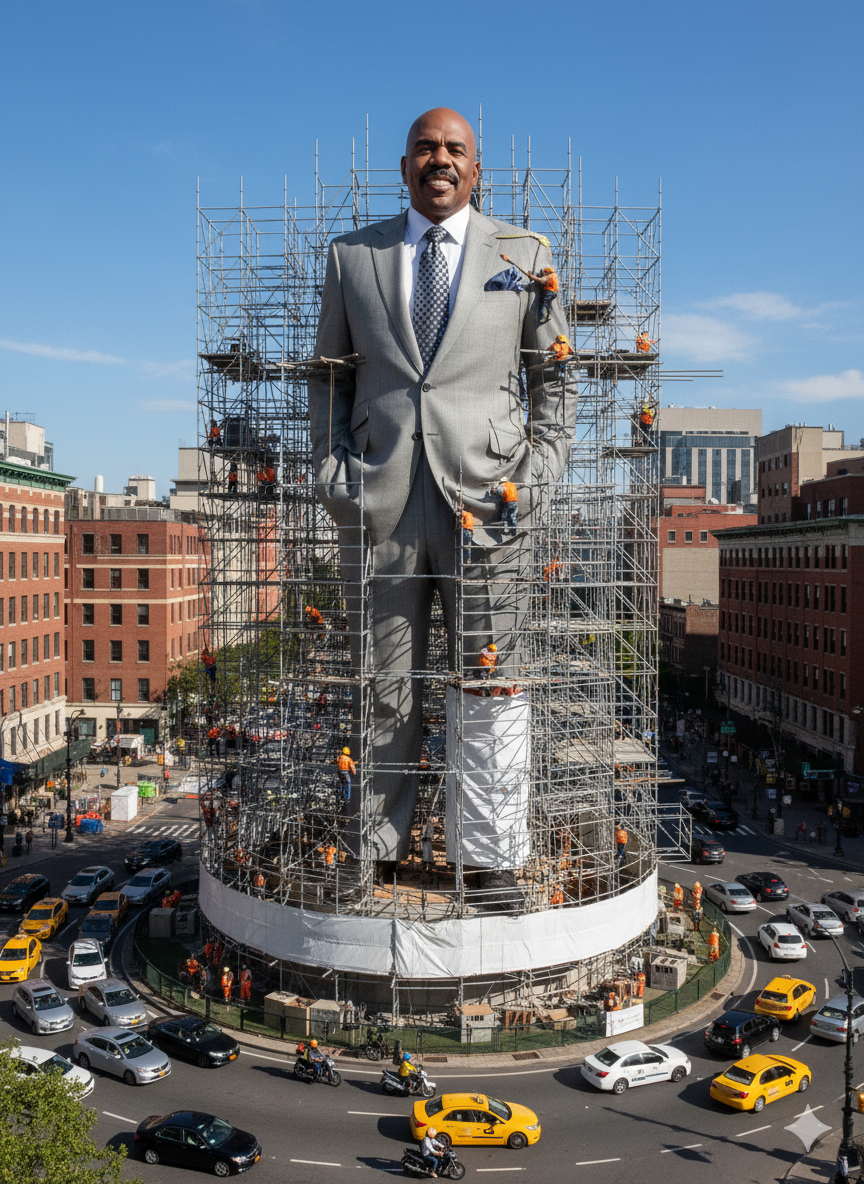
"A hyper-realistic giant statue of [uploaded person] standing in the middle of a roundabout. The statue is under construction, surrounded by scaffolding and many construction workers in helmets and orange vests climbing on it. Realistic city background with cars and motorbikes around the roundabout. Bright blue sky, daytime, photorealistic style."
"A massive billboard in Times Square displaying a hyper-realistic advertisement of [uploaded person] as a futuristic superhero. The billboard is ultra-bright with neon lights, surrounded by other electronic ads and bustling crowds of tourists. Photorealistic night scene, reflections on wet pavement, cinematic wide-angle shot."
Try these also:
"A museum exhibition showcasing a life-sized wax figure of [uploaded person], displayed under spotlights inside a glass case. Visitors with cameras and notepads are observing and taking photos. The museum walls are decorated with historical posters and plaques explaining the figure. Ultra-detailed, photorealistic style, warm indoor lighting."
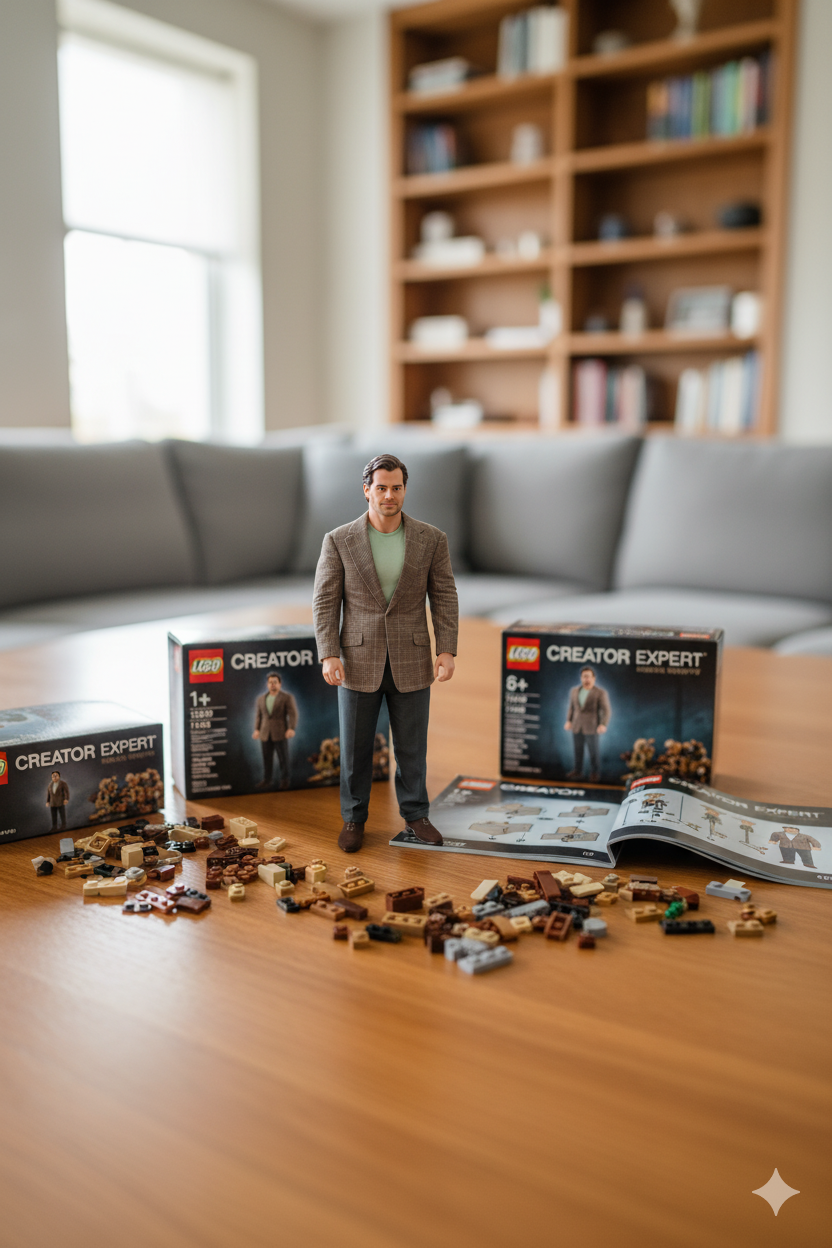
"A hyper-detailed LEGO set recreation of [uploaded person], displayed on a polished wooden table. The LEGO model is surrounded by opened LEGO boxes, instruction booklets, and scattered bricks. The background shows a modern living room with a couch and bookshelf. Photorealistic macro photography style, natural daylight from a window."
Summary
Nano Banana AI ရဲ့ figurine prompt ကတော့ လက်တွေ့ အရုပ်ထုတ်လုပ်စရာမလိုဘဲ Virtual World ထဲမှာ အမှန်တကယ်လို Figurine အရုပ်ပုံတွေကို ချက်ချင်း ဖန်တီးနိုင်စေပါတယ်။ ဒီအတွက် Nano Banana AI Figurine Trend ကလည်း လူကြိုက်များပြီး ဂီတ၊ အနုပညာ၊ ဂိမ်းဇာတ်ကောင်တွေကို နွယ်နွယ်ပေါင်းပြီး အသစ်တစ်ခုအဖြစ် ပြန်တွေ့မြင်စေပါတယ်။
👉 ခေတ်စားနေတဲ့ Nano Banana AI Trend ထဲကို ပါဝင်ချင်ရင် ကိုယ့်ရဲ့ ဇာတ်ကောင်ကို Figurine ပုံစံနဲ့ Generate လုပ်ကြည့်ပါ၊ သင့်ပုံကလည်း Viral ဖြစ်လာနိုင်ပါတယ်။
If you are interested in or want to learn more about Microsoft 365 and other products, Thetys Myanmar You can contact us to discuss details.
reference website : Fusion Solution, Fusion Solution Vietnam
Related Articles
- What is Gemini's Nano Banana AI?
- Copilot's GPT-5 – New Copilot Feature for Developers and Entrepreneurs
- With Copilot 3D, you can now turn 2D images into 3D models with just one click.
- Microsoft Excel's New Function – Copilot() Function
- The difference between Chatgpt and Copilot: When should you use which AI?
- GPT-5 for Developers: Developer များအတွက် OpenAI ရဲ့ GPT-5