
Anthropic အနေနဲ့ Claude AI မှာ အသစ်ထပ်မံထည့်သွင်းလိုက်တဲ့ Feature တစ်ခုကတော့ Claude AI နဲ့ File create /edit နည်းလမ်းဖြစ်ပါတယ်။ ယခင်က Claude ကို သုံးတဲ့အခါ Chat-based အဖြေများပဲ ရရှိနိုင်ခဲ့သော်လည်း ယခု update အသစ်မှာတော့ အသုံးပြုသူများက Claude AI ကို တိုက်ရိုက် File တွေ ဖန်တီး ပြင်ဆင် ခိုင်းနိုင်တော့မှာဖြစ်ပါတယ်။

Claude AI နဲ့ ဘာတွေ လုပ်နိုင်မလဲ?
Claude ရဲ့ File Creation Update က အောက်ပါ အလုပ်တွေကို လွယ်လွယ်ကူကူ လုပ်ဆောင်နိုင်စေပါတယ် –
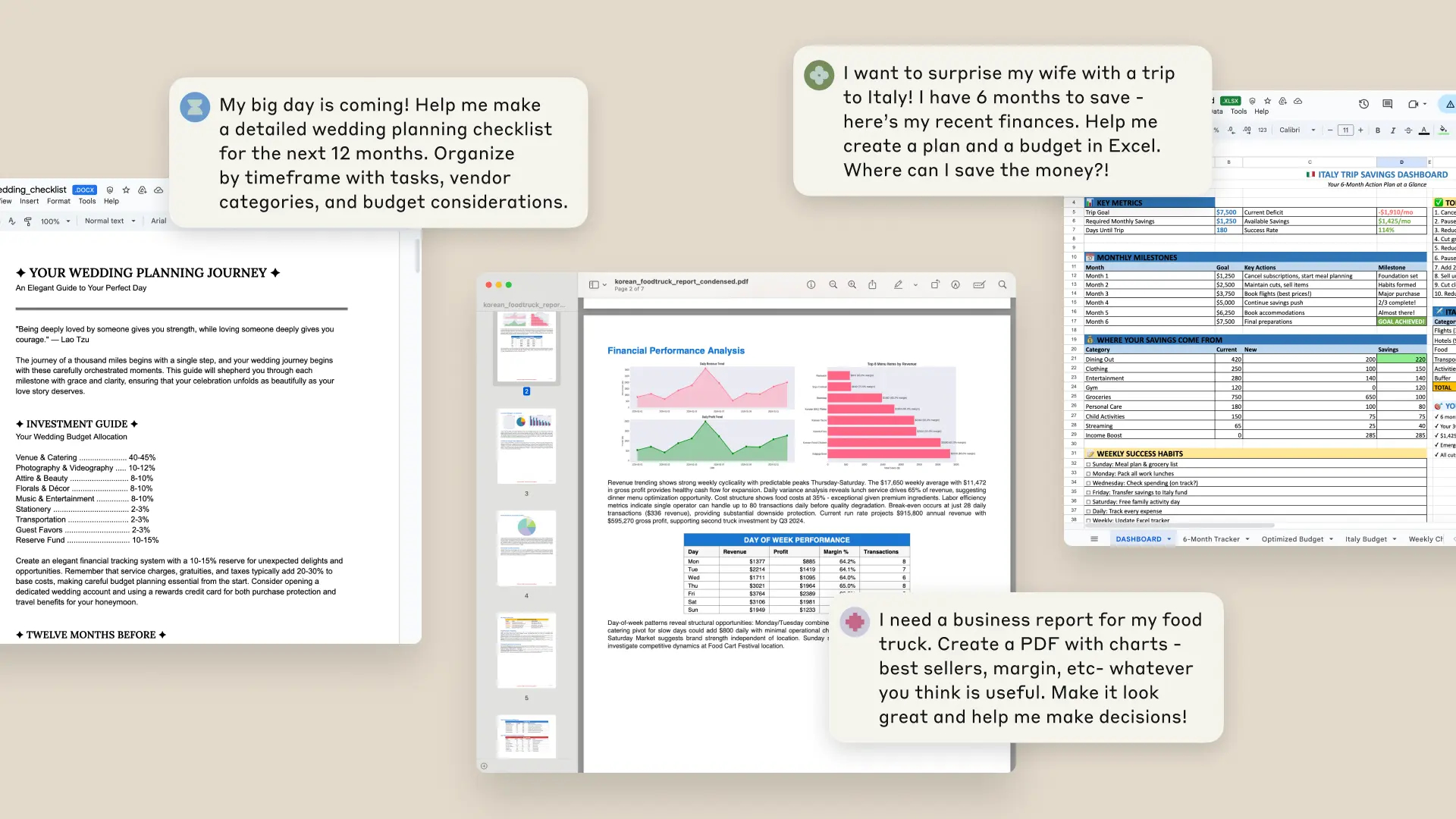
- Data ကို Insight ပြောင်းခြင်း → Raw Data ကို Clean လုပ်ပြီး၊ Statistical Analysis, Chart, Written Insights နဲ့ ပြန်ပေးနိုင်သည်။
- Excel Spreadsheets တည်ဆောက်ခြင်း → Budget Template, Project Tracker, Financial Model တို့ကို Formula & Multiple Sheets ဖြင့် တည်ဆောက်ပေးနိုင်သည်။
- Cross-format Work → PDF → PowerPoint, Meeting Notes → Word Document, Invoice → Organized Spreadsheet တို့လို မျိုးစုံ Format Conversion လုပ်ပေးနိုင်သည်။
အသုံးပြုနိုင်မယ့် အကျိုးကျေးဇူးများ
| Benefit | Description |
| အချိန်သက်သာမှု | Programming/Statistical Knowledge မလိုဘဲ Minutes အတွင်း File ပြီးစီး |
| အမှန်တကယ်အသုံးဝင်မှု | Customer Segmentation, Sales Forecasting, Budget Tracking တို့ကို အချိန်တိုအတွင်း ရရှိနိုင် |
| Collaboration | Claude ကို Strategy ပေးပြီး Technical Work ကို 맡အောင် လုပ်ပေးနိုင် |
| Multi-format Support | Excel, Word, PowerPoint, PDF တို့ကို တပြိုင်နက် Handle လုပ်နိုင် |
ဘယ်လို အလုပ်လုပ်သလဲ?
Claude ကို Private Computer Environment ပေးထားပြီး၊ အဲဒီနေရာမှာ Code ရေးနိုင်သလို၊ Program Run လည်း လုပ်နိုင်ပါတယ်။
ဒါကြောင့် –
- User က Context နဲ့ Strategy ပေးမယ်
- Claude က နောက်ကွယ် Technical Implementation ကို လုပ်ဆောင်မယ်
ဒါကြောင့် Idea နဲ့ Execution အကြားက အချိန်နည်း gap ကို လျော့ချပေးသလို၊ စိန်ခေါ်မှုကြီးမားတဲ့ Project တွေကိုလည်း Conversation သုံးပြီး တည်ဆောက်နိုင်ပါသည်။
ဘယ်လို စတင်အသုံးပြုရမလဲ?
Claude AI File Create ကို စတင်အသုံးပြုချင်သူများအတွက် –
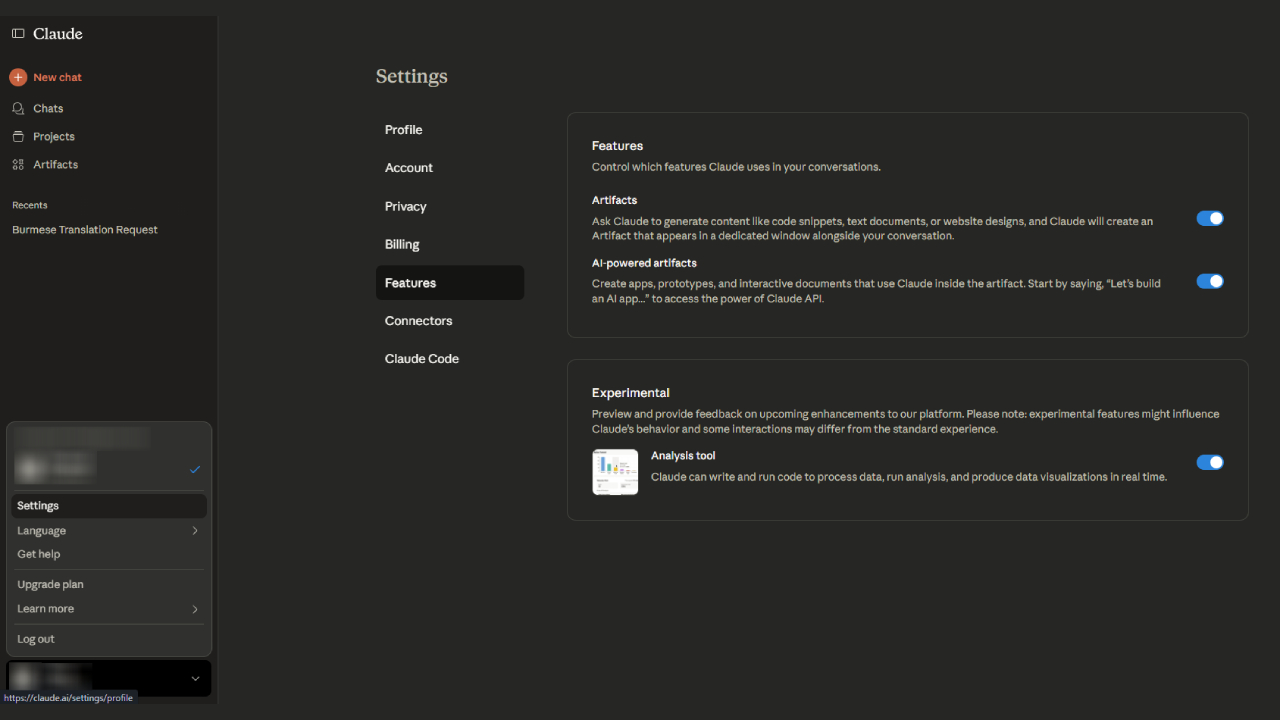
- Settings > Features > Experimental ထဲမှာ “Upgraded file creation and analysis” ကို Enable လုပ်ပါ။
- လိုအပ်သည့် File (Data, PDF, Notes) ကို Upload လုပ်ပါ သို့မဟုတ် လိုချင်တဲ့ Result ကို တိုက်ရိုက် ဖော်ပြပါ။
- Claude နဲ့ Chat မှာ Step by Step Guide ပေးပါ။
- Output File ကို Download လုပ်နိုင်သလို Google Drive ထဲမှာလည်း တိုက်ရိုက် Save လုပ်နိုင်ပါသည်။
စတင်တဲ့အခါ Simple Task (Data Cleaning, Simple Reports) တွေနဲ့ စပြီး၊ Financial Models, Forecasting Projects တို့လို Complex Task တွေဆီ ဆက်လက်တိုးသွားသင့်ပါသည်။
အကျိုးသက်ရောက်မှု
ယခင် Claude သုံးစွဲမှုနဲ့ နှိုင်းယှဉ်လိုက်ရင် –
- Text Answer တစ်ခုထဲ မဟုတ်တော့ဘဲ
- Excel, Word, PowerPoint, PDF အနေနဲ့ တိုက်ရိုက် Result ရနိုင်ခြင်း
- User တွေကို နည်းပညာပိုင်း အခက်အခဲမရှိဘဲ Data-driven Decision Making လုပ်နိုင်အောင် ကူညီပေးခြင်း
ဒီ Update ဟာ Claude ကို Text Assistant ကနေ Work Partner အဖြစ် Upgrade လုပ်ပေးပြီး AI နဲ့ Collaboration အတွေ့အကြုံကို Level တစ်ခုမြင့်တက်စေပါတယ်။
Summary
Claude ရဲ့ Claude AI File Create Update ဟာ File Creation, Editing, Sharing တွေကို တိုက်ရိုက် Conversation မှာ ဆောင်ရွက်နိုင်စေပြီး၊ လုပ်ငန်းတွေအတွက် Productivity တိုးတက်စေသလို၊ နည်းပညာမကျွမ်းသူတွေအတွက်ပါ အချိန်တိုအတွင်း အသုံးချနိုင်မယ့် အလွန်အဆင်ပြေတဲ့ Feature တစ်ခု ဖြစ်လာပါသည်။
If you are interested in or want to learn more about Microsoft 365 and other products, Thetys Myanmar You can contact us to discuss details.
reference website : Fusion Solution, Fusion Solution Vietnam
Related Articles
- GPT-5 Codex — OpenAI's Best AI Coding Assistant
- Free Copilot Chat Feature in Microsoft Office Apps
- What is Customer Relationship Management CRM? How to use it?
- Chatbot Definition – What You Need to Know
- More about Power B
- Make figurines and join the Nano Banana AI Trend