What is Microsoft 365 (M365)?
Microsoft 365 (formerly Office 365) is a cloud-based service that includes Microsoft's productivity apps (Word, Excel, PowerPoint) as well as many modern tools such as Microsoft Teams, OneDrive, Outlook, SharePoint, Planner, Loop, etc.
Mainly Businesses, students, and general users It was created with the aim of enabling digital work anytime and anywhere.
Apps & Services

| App/Service | Benefit |
| Word | Write and format messages |
| Excel | Calculate and save lists using formulas. |
| PowerPoint | Create presentations |
| Outlook | Email system and Calendar integration |
| OneDrive | Cloud storage up to 1TB (Personal) |
| Teams | Video meetings, Team chat |
| SharePoint | Document library နှင့် Intranet portal |
| Planner / To Do | Task Management and Workflow Creation |
| Loop | Write down content ideas for real-time collaboration and develop project plans. |
| Forms / Bookings | Creating Surveys, Taking Appointments |
| Defender / Intune / Purview (Business plans only) | Security & compliance tools |
Subscription Plans
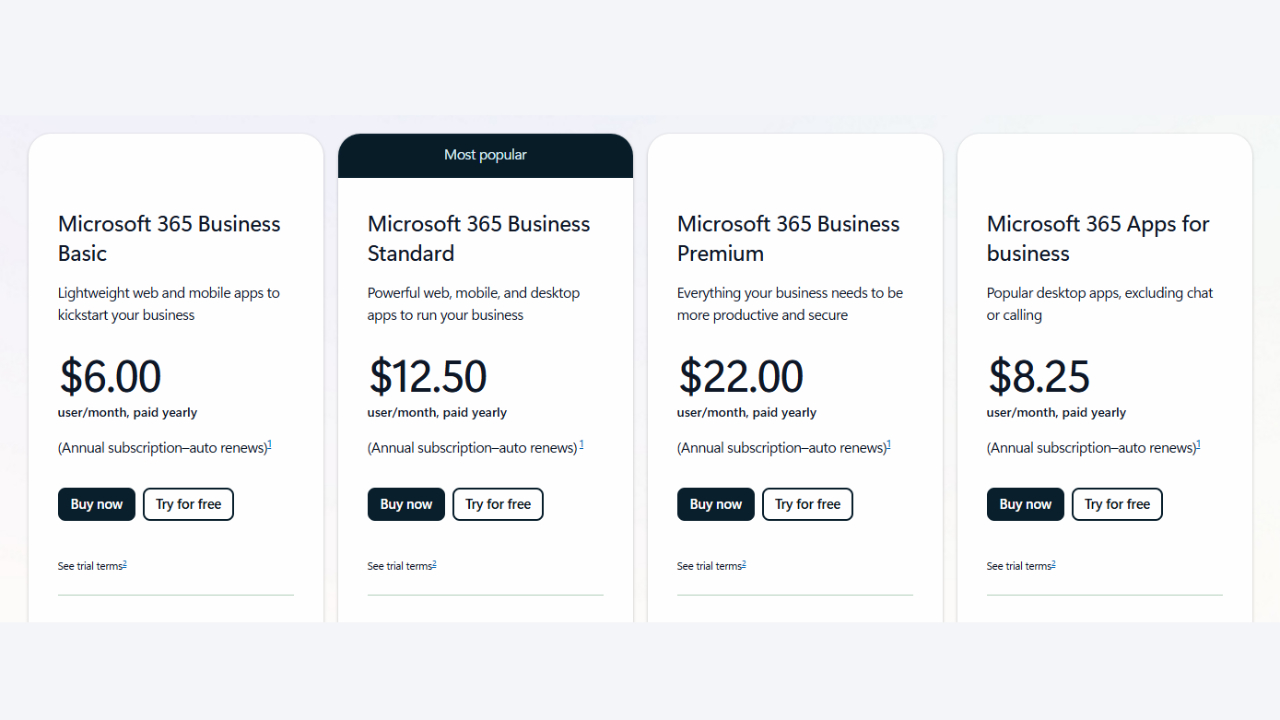
| Plan Name | Target Users | Key Features | Price (monthly) |
| Microsoft365 Personal | Individual use | 1TB OneDrive, All Office apps | $6.99 |
| Microsoft365 Family | Up to 6 families | Shared apps & storage | $9.99 |
| Microsoft365 Business Basic | Business starters | Web version apps only, Teams & Email | $6.00 |
| Microsoft365 Business Standard | SMEs | Desktop apps + Email Hosting | $12.50 |
| Microsoft365 Business Premium | Those who want to increase security | Azure AD, Defender, Intune ပါ | $22.00 |
| Microsoft365 Apps for Business | App only | Word, Excel, PowerPoint, no email | $8.25 |
Benefits of using Microsoft 365
Cloud-based usability
- Ability to store documents in the cloud.
- Easy to use via Internet-connected devices.
Auto update နဲ့ Always Latest Version
- Less security flaws because you can always use the up-to-date version.
Best for Collaboration
- Microsoft Teams, SharePoint, and Loop are very useful for real-time collaboration.
- Ability to edit documents with each other.
Security & Compliance
- Full and secure data protection with Microsoft Purview, Defender, and Conditional Access systems.
(Business premium includes device management (Intune).)
How is Microsoft 365 useful and for whom?
1. For students/teachers
- Writing Lecture Notes Using Word and OneNote
- Teaching online classes with Microsoft Team
- Creating Quizzes with Forms
2. For business people
- Easily manage reports with Excel
- Teams allows you to hold meetings with clients and team members.
- Easily create and edit project timelines with Planner
၃။ Remote Working
- Freelancers and remote workers can work from anywhere, on any device.
- Sync files to OneDrive and access them from any device
Summary
Microsoft 365 It is no longer a one-time purchase of software like in the past (Office 365). subscription (monthly payment) Because it has become users Always up-to-date version I'm only using .
As an individual or as a business, productivity, security, collaboration, scalability For these reasons, Microsoft 365 is the best platform to choose.
Now Microsoft 365 If you are interested in or would like to know more about Thetys Myanmar You can contact us to discuss details.
Reference website: Fusion Solution